Having provided a web-based scheduling solution, dhtmlxScheduler, we understand the importance of being able to share events and tasks between users or devices, which is often done via iCal format. Due to its popularity, iCal is widely used by many companies in their applications and software (e.g., Google Calendar, MS Outlook, Mac OS X, etc.). That’s why we created something that allows you to quickly and easily export/import iCal data to/from dhtmlxScheduler. This ’something’ is a new utility – “iCal exporter”.
Before, dhtmlxScheduler could load only simple events from the iCal format and had some issues with recurring events. The tool we’re presenting today will allow you to transfer the events data from the iCal format to the format readable by dhtmlxScheduler, and vice versa (from dhtmlxScheduler to iCal). This will give you an effective way to export dhtmlxScheduler data to/from MS Outlook or Google Calendar.
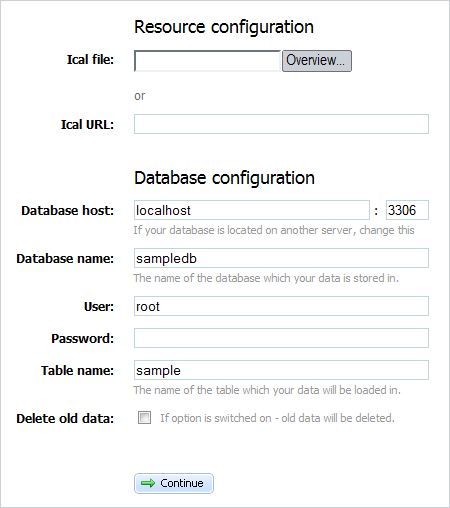
dhtmlxScheduler - Import from iCal - Web Interface
This “iCal exporter” tool has a simple web interface where you can set some resource and database configuration options. Alternatively, you can insert the code of the “exporter”, a set of PHP classes, into your own application to provide iCal export functionality for the scheduler “behind the scenes”.
With this tool you can export iCal files to XML format and use it to populate the scheduler with data, or to an Array, as an intermediate variant. All related information is already in the dhtmlxScheduler documentation where you can find all the details:
http://docs.dhtmlx.com/doku.php?id=dhtmlxscheduler:ical_export_import
To download the package, please follow the link: http://www.dhtmlx.com/docs/download/ical2scheduler.zip
Will this tool work to import a calendar from Outlook?
Yep, you can save data from Outlook as ical, and import it in the scheduler.
(by the way, if you’re not using recurring events, the calendar events can be imported directly, without any tools)
I am very new to PHP and Wordpress, please can you point me to a guide on how to use the import script/tool shown above, to import from an ical file to my DB?
Any help would be hugely appreciated.
Well, seems support wasn’t able to help me before I worked it out.
Here’s what to do for anyone not in the know…
Download the zip file ical2schedule.zip
Unpack
Navigate to your wordpress install on your webserver.
Navigate to wp-content/plugins/event-calendar-scheduler (make sure the plugin is installed)
Add index.php from extracted folder to this folder.
Copy all files from the codebase file from extract and paste into existing codebase folder in web directory.
In browser, navigate to http://yoursite.com/wp-content/plugins/event-calendar-scheduler/index.php and you will be see the page above!
Good times
Haydn, thank you for sharing your experience.
Please note that if you have any technical questions, it’s better to submit them to the forum:
http://forum.dhtmlx.com/ (registration is free)
Hi all,
Is there a way to generate a permanent iCal file? Let’s say, that it is updated after every edit in the scheduler?
Thanx!
Yep, you can save data from the scheduler in the DB, as normally.
Just add some extra logic in normal saving callback, which will use ICalExporter class. Check:
http://docs.dhtmlx.com/doku.php?id=dhtmlxscheduler:ical_export_import#ical_exporter_front-end
Thanx!
But unformtunately, I can’t seem to figure it out :(
I just haven’t got any clue:
1) where and how to create a trigger (you call it ’saving callback’)
2) which code I should use after that trigger
I am now using:
toICal($events);
file_put_contents(”ical.ics”);
?>
Result: a white screen
But there isn’t created a file called ical.ics at all.
Do you have any more ideas?
Thanx in advance for your reply,
Maurice.
Maurice, please post your question to the forum: http://forum.dhtmlx.com/viewforum.php?f=6
(registration is free)
will this allow me to keep my google calendar account in sync with my scheduler calendar? Like, add an event to the scheduler and it automatically shows up on my google cal and vice versa?
Ron, unfortunately it will not.
Hi!
The import utility uses php. Is there a java version?
There is no a JAVA version yet.
Is is possible to import more than one iCal file at a time?
UI doesn’t allow it, but you can use underline php class to import as many files as necessary.