DHX Quick Tables. Pilot

It’s a first step in our attempt to get DHTMLX library closer to people who do not want or do not know how to write the code, but need to have something for showing/updating data they store in the database. Even programmers sometimes need this to minimize the time spent on routine tasks.

Wanna get a data table quickly?

The secret is in one file, which can be downloaded here. It is based on dhtmlxGrid Standard Edition, dhtmlxLayout, and dhtmlxConnector. The tool is distributed under GNU GPL for free. We call it… Well, we’re still choosing the name for the “baby”. I’ll call it DHX Quick Tables. After all it really creates tables quickly…

So, what it can be used for and how it works.  For example, you need a back-end for your site, which is built on the database (or maybe you want to show your price list on the site, or any other information stored in the database). You can spend some time building forms and linking them to the database. This is a usual way, but not always necessary. Our solution offers simpler and faster alternative.

With the help of Quick Tables you get necessary number of web pages with tables linked to the database records. Two entries are available: for guests (just view the tables) and for administrator (view, edit, add/delete pages). Thus, you can put it on the backend of your database-driven site and be able to access and update data. Or you can show resulting table on your website, if tabulated data is what you need. Visitors will be able to navigate through the huge amount of records (as we’ve added smart rendering to the page), sort and filter the information. In the next build of the tool we’ll also add printing and other nice features.

First run

Ok, at first you need to download the installation file here and unpack install.php – this is the only file you need. Then upload it on your site into some folder (PHP support is required, of course). The name of my folder is EH65DBN09G1DF100 (yes, it’s quite complicated), but you can choose any other name for the folder, it doesn’t matter. So, put install.php there and load it through the browser – like this: http://www.yoursite.com/EH65DBN09G1DF100/install.php

The tool will be installed and the wizard will be loaded right away.

Wizard Steps:

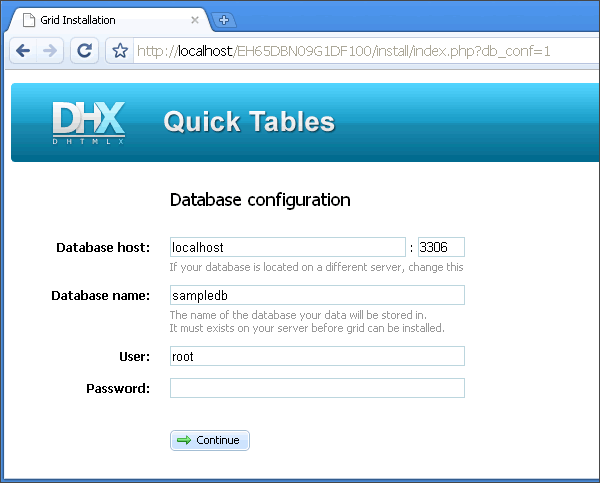
1. You need to connect the tool to your database. If you have the database, you definitely have connection parameters. So, just enter them here:

sc001_cut

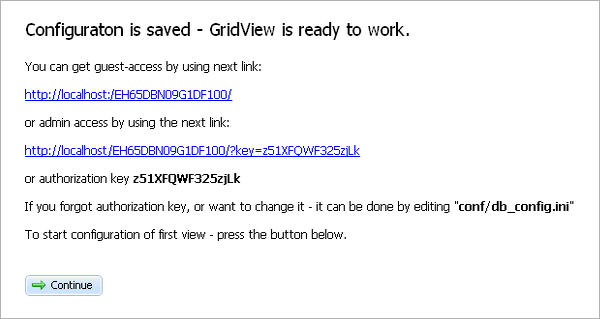
2. If connection is successful, you’ll get the following screen:
sc002_cut

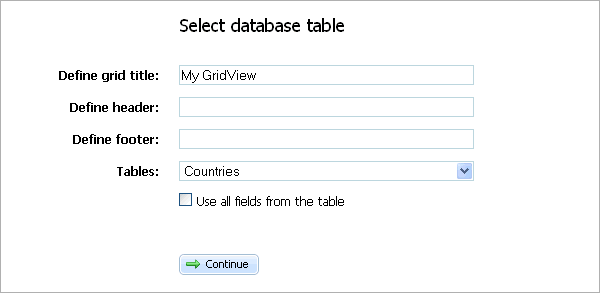
When you continue, you’ll need to choose the name for the page and select database table (headers and footers are also allowed, but we’ll skip them for now). Also I’ll leave checkbox not checked to choose necessary table fields in the next step.
sc003_cut

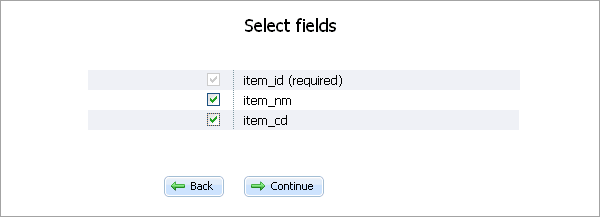
Now choose what fields to show in the table. I choose all, as I don’t have so many to choose from …

sc004_cut

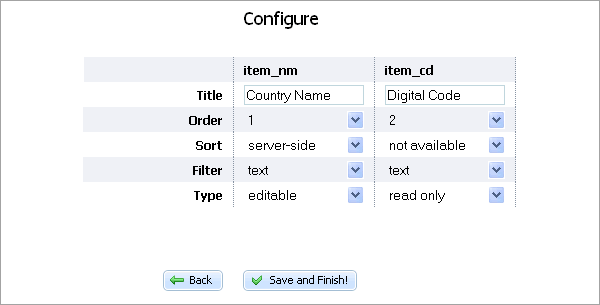
Now you define title for each field, its position, sorting, filtering and type (editable, read only, checkbox etc.)

sc005_cut

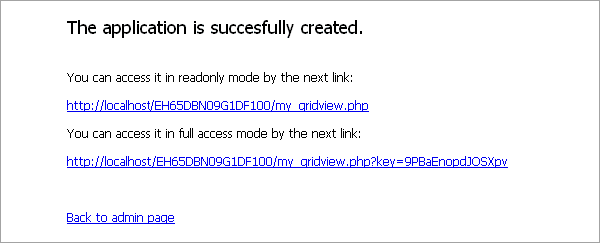
Generally that is all you need to create a page. Click Save and Finish! and you’ll get this:

sc006_cut

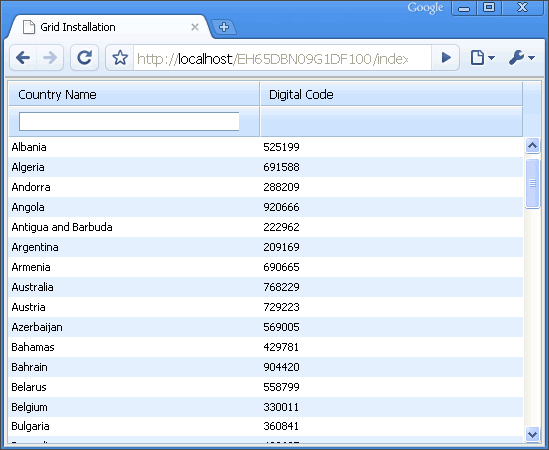
First link is for guests – visitors can look, but not edit. You can use it for your site public side, for example (btw, live example is here). To enter/update data, use the second link. Here is what you get:
sc007_cut

Back to the beginning

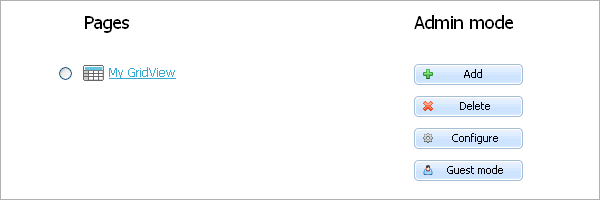
You are able to access pages through control panel of the tool (just browse to the directory you started at. In my example it is http://localhost/EH65DBN09G1DF100/). Control panel works in two modes: Guest (just view the data) and Admin (everything else):
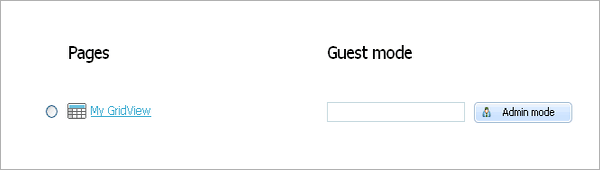
sc008_cut

To enter Admin mode, you’ll need to put the code into the text field. The code was shown on the 2nd step. You can see it in conf/db_config.ini as well. So, I entered the code and now I’m in admin mode:

sc009_cut

As you can see, here we can Add/Delete pages, edit configuration file or return to the Guest mode. And of course we can open pages in admin mode (add/delete/update records).

And again – the goal is to offer the way of building simple applications without necessity to be a javascript guru or even a professional programmer. And this is the first step to the goal.

To try generated pages in action, click here.

Posted by Inga Kravtsova

Comments

  1. Bojan,
    December 16, 2009 at 7:38 am

    It’s almost everything I need.

    Is there possible that I can select a category for news (news(id_n, title, date, id_c), categories(id_c,title)) with select/option.

    Greetings!

  2. Daniel,
    December 16, 2009 at 9:58 am

    Awesome. Excellent idea and implementation of a quick database editor. Already installed and sent to a client so they can edit a database when I’d been hesitant to give them access to PHPmyAdmin.

  3. ivan,
    December 16, 2009 at 10:01 am

    to Bojan: There is no such a possibility right now, but that’s only a prototype and we’re going to add this feature soon.

  4. Jean-Pierre Schutte,
    December 16, 2009 at 11:06 pm

    F-ing brilliant! :D Well done!!! Best thing since sliced bread! :D This quick tables is gonna come is great use! Thanks!

  5. mongkol,
    December 17, 2009 at 12:13 am

    this only mysql right

  6. DHX Quick Tables for Showing & Updat...,
    December 17, 2009 at 5:22 am

    [...] the help of DHX Quick Tables, you get necessary number of web pages with tables linked to the database records. Two entries are [...]

  7. AMB Album » DHX Quick Tables for S...,
    December 17, 2009 at 6:01 am

    [...] the help of DHX Quick Tables, you get necessary number of web pages with tables linked to the database records. Two entries are [...]

  8. ivan,
    December 17, 2009 at 6:08 am

    to mongkol: Yes, currently it works with mysql only, but we’re already working on the support for postgres, mssql, and oracle.

  9. Bojan,
    December 20, 2009 at 3:36 am

    It’s awesome. I can’t wait for next version!

  10.   DHX Quick Tables by Web...,
    December 25, 2009 at 4:31 am
  11. Open Mind » Blog-Archiv » DH...,
    December 26, 2009 at 1:07 pm

    [...] Datentabelle ins Web zu stellen ist keine Hexerei, kostet aber einige Stunden Arbeit. Mit DHX Quick Tables und etwas Routine schafft man es auch in einer halben Stunde, und das Ergebnis sieht erst noch sehr [...]

  12. Connie,
    December 27, 2009 at 2:10 am

    Unfortunately it is not possible to print your website / tutorial
    your print stylesheet cuts after the first page

    direct printing also shows only the first page in Firefox, in Opera 10 it is ok

    what a shame! ;=(

  13. Connie,
    December 28, 2009 at 3:03 am

    Privet!

    After installing the script, I was astonished how easy it works.
    But for sure more and more demands arise:

    1. What is meant with “header” and “footer”, what to put there?
    2. How to define a codepage for the output, there is no charset defined, I need UTF-8

    “”

    Cheers and “snovim godom”, Connie

  14. ivan,
    January 4, 2010 at 6:54 am

    to Connie:

    Happy New Year!

    >1. What is meant with “header” and “footer”, what to put there?
    Custom text, which will be added to the top and bottom of the view, you can place any text there.

    >2. How to define a codepage for the output, there is no charset defined, I need UTF-8
    Currently it uses the default charset for html pages. The only way to set custom encoding – place necessary instruction into generated pages (the DB related part of code is using UTF-8 by default).

    > Unfortunately it is not possible to print your website / tutorial
    We’ll check what’s wrong with this. Thank you for reporting!

  15. Instant Custom Data Editor: DHX Quick Ta...,
    January 5, 2010 at 2:54 am

    [...] DHX Quick Tables is a 1 file PHP script that enables anyone to create a customized backend for MySQL databases with 2 screens: [...]

  16. Dirk,
    January 5, 2010 at 4:07 am

    Great script!

    Do you plan to add a HTML-Editor for text fields?

  17. Stephan,
    January 5, 2010 at 4:53 am

    oh how I’ve been looking for something like this! question, though (and I haven’t installed it yet to try myself), is there a way to ‘port’ the results to other parts of your website, so for example all the admin stuff could exist in a different folder from the public pages?

  18. ivan,
    January 5, 2010 at 7:03 am

    to Dirk:
    No, we didn’t plan to add this feature.

    to Stephan:
    > is there a way to ‘port’ the results to other parts of your website, so for example all the admin
    > stuff could exist in a different folder from the public pages?
    While it will not work “out of the box”, it’s possible to copy generated pages to some different folder, so you will be able to access the same functionality in different locations.

  19. Manuel,
    January 5, 2010 at 12:33 pm

    Hi,

    first I thougt this one is just the one thing I’ve and now I don’t have to code it myself, but…

    1. I need utf-8, too. setting html header in generated php-file doesn’t work as it’s processed via other files.

    2. I am NOT able to change files, cause I’m not the owner. Changin owner fails, as I hafe no shell

    3. some files can be deleted and be uploaded again for “changing” owner – however I can’t delete *processor.js… and hey. A script, that’s cuts down my rights to delete files on my own webspace? come on.

    But, hey: still a nice idea

  20. uberVU - social comments,
    January 5, 2010 at 3:05 pm

    Social comments and analytics for this post…

    This post was mentioned on Twitter by dhtmlx: DHX Quick Tables – working editable grid without single line of coding
    http://bit.ly/6AYuhK…

  21. Instant Custom Data Editor: DHX Quick Ta...,
    January 5, 2010 at 6:14 pm

    [...] web resources 6 Jan 2010 DHX Quick Tables is a 1 file PHP script that enables anyone to create a customized backend for MySQL databases with [...]

  22. Stephan,
    January 6, 2010 at 4:47 am

    @Manuel – see if your server is using suPHP, that will make sure the permissions are set as your hosting account username (not “nobody” or “root” or “apache”) which would allow for file deletion. I’m assuming of course you’re on a Unix box.

    @ivan – thanks for the tip, I’ll tinker with it once I install this.

  23. ivan,
    January 6, 2010 at 7:45 am

    to Manuel:
    (1) – we will add the ability to control encoding for sure;
    (2) – all files are created by php script, so the php script is the owner technically.

  24. CNET.ro» Blog Archive » DHX ...,
    January 7, 2010 at 8:28 am

    [...] utile celor ce dezvoltă webaplicaţii – dar costă – a publicat o încercare numită temporar DHX Quick Tables, fiind vorba de un singur fişier PHP (unul singur!), care se “despachetează” singur într-o [...]

  25. Instant Custom Data Editor: DHX Quick Ta...,
    January 10, 2010 at 12:07 am

    [...] DHX Quick Tables is a 1 file PHP script that enables anyone to create a customized backend for MySQL databases with 2 screens: [...]

  26. viet flex,
    January 13, 2010 at 9:40 am

    Very nice tool

  27. mahesh,
    January 14, 2010 at 7:22 pm

    This works nicely for mySQL. I was trying to integrate the pdf printing module on the blog with this, and it seems to fail. Is there a way to do this?

  28. » Blog Archive » DHX Quick T...,
    January 15, 2010 at 2:08 am

    [...] DHX Quick Tables erstellt man im Internet schnell eine sortierbare, durchsuchbare und editierbare [...]

  29. ivan,
    January 15, 2010 at 2:21 am

    Manesh, printing will be available by default in the next version. As for now it can be added by adding extra scripts from the mentioned articles and some kind of button which will call toPDF method.

  30. DHX Quick Table - Einfache GUIs für MyS...,
    January 15, 2010 at 4:22 am

    [...] dieser Stelle kann sich DHX Quick Table als nützlich [...]

  31. Frank,
    January 19, 2010 at 5:01 pm

    OMG, this is exactly what i need!!! I am not a programmer but i am in dire need of an backend for ne of my sites with an complexe db…installed it(note to everybody, make sure your folder where the file is in has write permissions!)

    I just run in some little issues, i have a field in the table what reflects the first field (the ID) and this is not shown in the grid, i assume it has something to do with the fact that this field is set to auto increment, any idea anybody? Help is greatly appreciated

    Thx,

    Frank

  32. Frank,
    January 19, 2010 at 5:28 pm

    OK guys, i just figured it out, i had to rename the first field id/name in the configuration ini(the first field in there was useless anyway) lol…

    I cannot wait for the next version, awesome job!!

    Thx

    Frank

  33. mahesh,
    January 22, 2010 at 10:04 am

    I am looking at the edit configuration file:

    It says sort = “na”

    I was hoping it would be like the grid where if you click on the top some autosorting occurs on that column. It place of this, what are my options for changing this part of the configuration file?

    sort= ‘[what can I put here]‘ ?

    I was ablle to integrate this with the pdf scripts

  34. mahesh,
    January 22, 2010 at 10:14 pm

    Problem solved: the other option in the config file is

    sort=”connector”

  35. vola,
    January 26, 2010 at 11:12 pm

    Hi.
    Nice tool, but I have two problems.
    1. The header and footer variables I set in the configure file are not in the html page.
    2. The loading of the page hang up when I starte the browser (firefox or IE) for the first time, after pressing the reload button the page is loading.

    Any solution for this problems?

    • ivan,
      January 28, 2010 at 5:04 am

      Vola,

      (1) this is a known issue, will be fixed in oncoming update;
      (2) unfortunately we can’t reconstruct the issue, if it still occurs – please drop an email to support (at) dhtmlx.com with the link, where it can be reconstructed.

      • vola,
        February 1, 2010 at 6:15 am

        ivan,
        (1) when will the update published?
        (2) ok, it is a problem on our side not a problem of the software.

        New question:
        to switch to the admin mode we enter the password in plain text likewise in the links to the pages in the adminmode the password is in plaintext. Is there a plan to use the password not in plain format?

        Example:
        http://localhost/informations/accounts.php?key=adminpassword

        • ivan,
          February 3, 2010 at 3:38 am

          Vola,

          (1) End of february
          (3) Currently we do not have plans to add complex user-management functionality, with separate login and password storage. But we plan to update the code, so password will not be stored directly in links.

          • vola,
            March 4, 2010 at 7:31 am

            Hi Ivan.
            Is the new version now published?

  36. mahesh,
    January 31, 2010 at 4:24 pm

    I just noticed the header and footer were not being printed as well.

  37. DHX Quick Tables. Pilot « DHTMLX Blog |...,
    April 30, 2010 at 4:07 am

    [...] more: DHX Quick Tables. Pilot « DHTMLX Blog If you enjoyed this article please consider sharing [...]

  38. 123doing,
    June 9, 2010 at 6:59 am

    It’s very good.
    I like this.
    Thanks for share.
    And I wrote something to introduce this project for my readers.
    You can find the post about this in my website.http://123doing.com
    If something is wrong,pls figure it out.thanks.

  39. DHX Quick Tables 开源项目 - Ajax代...,
    June 9, 2010 at 7:00 am

    [...] DHX Quick Tables 项目主页 | DHX Quick Tables 项目下载 | DHX Quick Tables 中文支持 [...]

  40. josh,
    August 26, 2010 at 7:47 am

    Is there an update for this nice tool (that works with mssql/…) or is this a dead project??

    • ivan,
      August 26, 2010 at 2:27 pm

      There no update yet, but we’re working on it. If there wont be more urgent/important tasks, the update will be released in September-October.

Leave a Reply