
In this tutorial we are going to explain how to use dhtmlxGrid with ASP.NET MVC. Following this article step by step will allow you to implement an editable datagrid with sorting and filtering capabilities. We will also describe how to bind the grid data to the database and update it on the server side when user makes changes in browser.
We will use the Standard Edition of dhtmlxGrid, which is available under GNU GPL. As an example, we will create a table of users. Not to do the same work twice, we just use the same records that were used for our RoR implementation. The image below shows how our datagrid will look.
Download the final demo and follow the tutorial to integrate dhtmlxGrid in an ASP.NET MVC application.
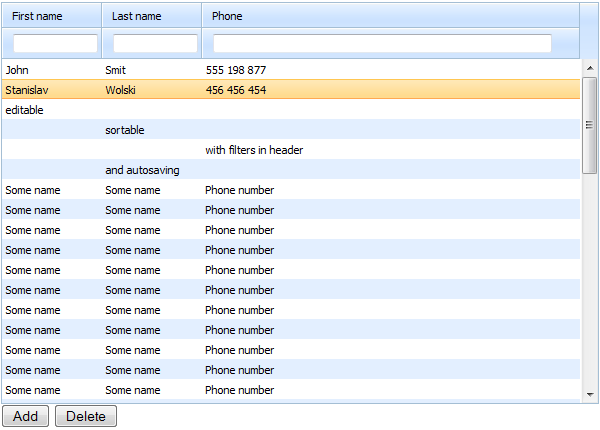
Grid with ASP.NET MVC Example
Setting the Environment
First we create an empty ASP.NET MVC application. We should also create a database and a table of users. There will be 3 fields for storing: First Name, Last Name, and Phone Number.
We need to create a folder for the database. Go to project->Add->Add ASP.Net folder and add folder App_data. In this folder we create a database with one table – Users:
- id – int, primary
- first_name – nvarchar(128)
- last_name – nvarchar(128)
- phone – nvarchar(128)
NOTE: You can also create a database on MS SQL Server. In this case, you will need to add connectionString in web.config manually.
Then we’re creating a model and controller for our demo. Add /Controllers/AdminController.cs:
{
public ActionResult Index()
{
return View();
}
}
We also should add a new data model. Go to Models->Add->New Item->Linq to SQL classes. The name of the file will be GridUsers.dbml. In the visual designer we create a mapping object of the table Users (you can just drag-n-drop the table from ServerExplorer into the visual designer).
Now we are ready to use dhtmlxGrid and start building the main part of our table Users.
Loading Empty Grid
Download the latest dhtmlxGrid Standard package. Unzip it and copy the folders dhtmlxGrid/codebase and dhtmlxDataProcessor/codebase to the /Scripts/ folder of your demo application.
The dhtmlxGrid package includes a lot of examples and supporting materials, which are not necessary for our demo. We are taking only the files that are required to build the grid.
After that we can add the first view – the file /Views/Admin/Index.aspx:
<!DOCTYPE HTML PUBLIC "-//W3C//DTD HTML 4.01 Transitional//EN"
"http://www.w3.org/TR/html4/loose.dtd">
<html>
<head>
<script src="/Scripts/dhtmlxcommon.js" type="text/javascript" charset="utf-8"></script>
<script src="/Scripts/dhtmlxgrid.js" type="text/javascript" charset="utf-8"></script>
<script src="/Scripts/dhtmlxgridcell.js" type="text/javascript" charset="utf-8"></script>
<link rel="stylesheet" href="/Scripts/dhtmlxgrid.css" type="text/css" media="screen" charset="utf-8">
<link rel="stylesheet" href="/Scripts/skins/dhtmlxgrid_dhx_skyblue.css" type="text/css" media="screen" charset="utf-8">
</head>
<body>
<div id="grid_here" style="width:600px; height:400px;">
</div>
<script type="text/javascript" charset="utf-8">
var grid = new dhtmlXGridObject("grid_here");
grid.setImagePath("/javascripts/codebase/imgs/");
grid.setHeader("First name, Last name, Phone");
grid.setInitWidths("100,100,*");
grid.setSkin("dhx_skyblue");
grid.init();
</script>
</body>
</html>
NOTE:
- setImagePath points to codebase/imgs from the dhtmlxGrid package.
- setHeader defines the structure of the grid, so the client-side grid will have columns to show data from our Users table (columns First Name, Last Name, and Phone Number).
- setInitWidths command defines the widths of columns, and * as the width for the last column enables auto-size for this column.
As you can see, this view doesn’t contain any active logic, it just loads .js and .css files and initializes a JavaScript grid on the page.
In Global.asax we should change the default settings of request routing:
public static void RegisterRoutes(RouteCollection routes){
…
routes.MapRoute(
"Default", // Route name
"{controller}/{action}/{id}", // URL with parameters
new { controller = "Admin", action = "Index", id = UrlParameter.Optional } // Parameter defaults
);
…
}
…
Now, if you run your demo application, you will see an empty grid with 3 columns. This will be the structure of our table of users:
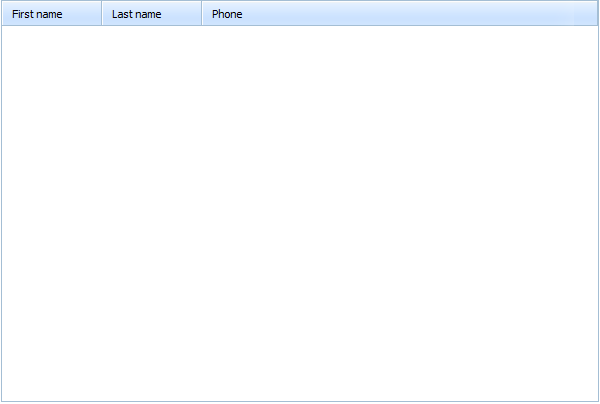
Grid with ASP.NET MVC - Empty Grid
Filling Grid with Data
Now we’re going to populate our datagrid with some data. dhtmlxGrid can load its content from an XML data source, so loading data into the grid is pretty simple.
We will add one more action in /Controllers/AdminController.cs:
{
public ActionResult Index()
{
return View();
}
public ActionResult Data()
{
var context = new GridUsersDataContext();
return View(context.Users);
}
}
Also, let’s create one more view. The file is /Views/Admin/Data.aspx:
<rows>
<% foreach (var user in Model) { %>
<row id="<%=user.id%>">
<cell><![CDATA[<%= user.first_name != null ? user.first_name : "" %>]]></cell>
<cell><![CDATA[<%= user.last_name != null ? user.last_name : "" %>]]></cell>
<cell><![CDATA[<%= user.phone != null ? user.phone : "" %>]]></cell>
</row>
<% } %>
</rows>
Inside the view we are outputting data from the Users table as XML.
Our last step will be to add one more line of code in the /Views/Admin/Index.aspx file:
var grid = new dhtmlXGridObject("grid_here");
grid.setImagePath("/javascripts/codebase/imgs/");
grid.setHeader("First name, Last name, Phone");
grid.setInitWidths("100,100,*");
grid.setSkin("dhx_skyblue");
grid.init();
grid.load("/Admin/Data?=" + grid.uid());//added !
</script>
“/Admin/Data?=” + grid.uid() – here we add a unique ID to the URL so the requests won’t be cached.
With this additional line, we’ve defined that the grid will load data from the XML we’ve just created.
Now our page is showing that the grid correctly loads the initial set of data.
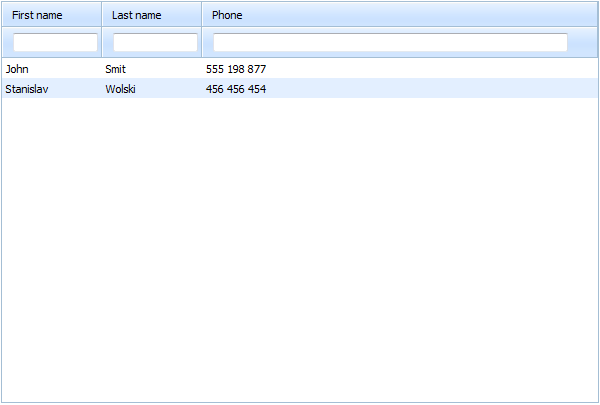
Grid with ASP.NET MVC - Loading Records in Grid
Saving Data to Server
With the previous steps completed, we created a grid that loads data from the database and displays it on a page. Now we need to add the ability to update database and save changes done by users when they edit grid records in the browser.
On this step we’ll use DataProcessor, a special extension which is available in the grid package and allows us to synchronize client-side data changes with the server-side database. To “turn on” the DataProcessor extension, we need to implement one more action.
We add a model for action response in /Models/ActionResponseModel.cs:
{
public string Status;
public long Source_id;
public long Target_id;
public ActionResponseModel(string status, long source_id, long target_id)
{
Status = status;
Source_id = source_id;
Target_id = target_id;
}
}
We add one more action for processing of update requests in /Controllers/AdminController.cs:
{
public ActionResult Index()
{
return View();
}
public ActionResult Data()
{
var context = new GridUsersDataContext();
return View(context.Users);
}
public ActionResult Save(User changedUser, FormCollection form)
{
string action_type = form["!nativeeditor_status"];
long source_id = long.Parse(form["gr_id"]);
long target_id = long.Parse(form["gr_id"]);
var context = new GridUsersDataContext();
try
{
switch (action_type)
{
case "inserted":
context.Users.InsertOnSubmit(changedUser);
break;
case "deleted":
changedUser = context.Users.SingleOrDefault(u => u.id == source_id);
context.Users.DeleteOnSubmit(changedUser);
break;
default: // "updated"
changedUser = context.Users.SingleOrDefault(u => u.id == source_id);
UpdateModel(changedUser);
break;
}
context.SubmitChanges();
target_id = changedUser.id;
}
catch (Exception e)
{
action_type = "error";
}
return View(new ActionResponseModel(action_type, source_id, target_id));
}
}
That’s quite a big piece of code, comparing to our previous steps. In our new Save method, we are doing the following:
- Getting the type of operation: inserted, updated or deleted
- Getting the ID of a grid row
Now the code executes logic for each operation: it adds a new user (a row in the table) for “inserted”; it deletes and updates user info for “deleted” and “inserted” operations.
In addition to this action, we need to create one more XML view, which will be a response to an update operation. In the file /Views/Admin/Save.aspx:
<data>
<action type="<%= Model.Status %>" sid="<%= Model.Source_id %>" tid="<%= Model.Target_id %>"></action>
</data>
The “Model.Target_id” parameter in the above code provides a new ID value, which can (and will) be changed after the insert operation. The grid creates a temporary ID for a new record, which needs to be changed with an actual ID after saving the grid data.
The server-side part is ready, so we only need to point our grid to the dbaction feed. We add in /Views/Admin/Index.aspx:
<!DOCTYPE HTML PUBLIC "-//W3C//DTD HTML 4.01 Transitional//EN"
"http://www.w3.org/TR/html4/loose.dtd">
<html>
<head>
<script src="/Scripts/dhtmlxcommon.js" type="text/javascript" charset="utf-8"></script>
<script src="/Scripts/dhtmlxgrid.js" type="text/javascript" charset="utf-8"></script>
<script src="/Scripts/dhtmlxgridcell.js" type="text/javascript" charset="utf-8"></script>
<link rel="stylesheet" href="/Scripts/dhtmlxgrid.css" type="text/css" media="screen" charset="utf-8">
<link rel="stylesheet" href="/Scripts/skins/dhtmlxgrid_dhx_skyblue.css" type="text/css" media="screen" charset="utf-8">
<script src="/Scripts/dhtmlxdataprocessor.js" type="text/javascript" charset="utf-8"></script>
</head>
<body>
<div id="grid_here" style="width:600px; height:400px;">
</div>
<script type="text/javascript" charset="utf-8">
var grid = new dhtmlXGridObject("grid_here");
grid.setImagePath("/Scripts/imgs/");
grid.setHeader("First name, Last name, Phone");
grid.setColumnIds("first_name,last_name,phone");//!added
grid.setInitWidths("100,100,*");
grid.setSkin("dhx_skyblue");
grid.init();
grid.load("/Admin/Data?=" + grid.uid());
dp = new dataProcessor("/Admin/Save");//!added
dp.setTransactionMode("POST", false);
dp.enableDataNames(true);
dp.init(grid);
</script>
<input type="button" value="Add" onclick="add();">
<input type="button" value="Delete" onclick="remove();">
</body>
</html>
With this code, we are:
- Including one more file to activate DataProcessor
- grid.setColumnIds(“first_name,last_name,phone”) – setting IDs to the grid columns (we used property names used in the model User)
- Adding four JS lines to initialize DataProcessor, pointing it to the Save action
- Adding buttons to add and delete rows in the grid
You can now try to edit the grid records, add or remove grid rows. You will see that all changes are saved in the database automatically.
The way to make “inserted” function work is:
- Click “Add” button. A new row with some default values will be added in the end of the grid.
- Enter real values in the cells of the new row.
The new row will be saved into the database table. Refresh the page and you will see all the changes you’ve just made.
Extra Functionality
If you remember, we were going to create a grid with sorting and filtering capabilities. These features can be added to our grid without any changes in the server-side logic.
We enable client-side filtering and sorting by adding the following code to the /Views/Admin/Index.aspx file:
...
<script type="text/javascript" charset="utf-8">
var grid = new dhtmlXGridObject("grid_here");
grid.setImagePath("/Scripts/imgs/");
grid.setHeader("First name, Last name, Phone");
grid.attachHeader("#text_filter,#text_filter,#text_filter"); //added !
grid.setColSorting("str,str,str"); //added !
Finally, we have a datagrid which uses client-side logic to perform sorting and filtering of data, and manages data communication with ASP.NET MVC on the backend.
Grid with ASP.NET MVC - Editable Grid
By clicking on the header you can sort the grid by any column. Typing text in input fields in the header will filter the grid records by entered text. When you edit records in the grid, the changes will be saved in the database automatically, as well as row addition and deletion (use the buttons below the grid).
You can download the full source code of the resulting demo.