Archive for October, 2011

dhtmlxSpreadsheet: Easy-to-Use Ajax Spreadsheet

Thursday, October 27th, 2011

Offering the tools that make the life of a web developer easier, we would like to introduce another helper – dhtmlxSpreadsheet. It can save a lot of time for those who need to integrate, manage, and share web-based data tables on the web.

Unlike online services (Google Docs, etc.), dhtmlxSpreadsheet can be installed on your website, allowing you to store the data in your own database. This tool is written in JavaScript and PHP (based on dhtmlxGrid) and enables you to put an Excel-like spreadsheet anywhere on a webpage.

dhtmlxSpreadsheet uses Ajax to load and update data on the server side. While the user edits the spreadsheet, adds or removes records, all these changes are automatically saved to the database.

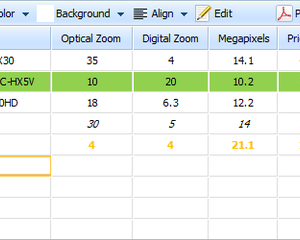
dhtmlxSpreadsheet - JavaScript & PHP Spreadsheet

dhtmlxSpreadsheet - JavaScript & PHP Spreadsheet

dhtmlxSpreadsheet is very easy to use. You only need a few minutes to get an editable data table with basic cell formatting, math functions, and keyboard navigation.

 
Read more »

Cross-Browser JavaScript Message Library

Tuesday, October 18th, 2011

After introducing a new dhtmlxMessage component in DHTMLX 3.0, we decided to enhance it and provide a complete solution for displaying dialog boxes on a web page. Using the code of dhtmlxMessage, we’ve created a lightweight JavaScript message library that is released under MIT license and can be used for free in any web app.

JavaScript Message Library from DHTMLX

JavaScript Message Library from DHTMLX

The library can be used to show alerts, confirm boxes, or unobtrusive popup messages to give the user additional info or explanations. The appearance of the dialog boxes can be easily customized. The library API gives you full control over the messages look and feel.

Message Library from DHTMLX - Confirm Box

Message Library from DHTMLX - Confirm Box

The source code of the message library is available on GitHub. You are welcome to use this library in your DHTMLX based applications (it has native DHTMLX skin) or in your other projects. The library is only 3Kb (gzipped) and works in the majority of web browsers (IE, FF, Chrome, Safari, Opera).

Autocompletion in IDEs for DHTMLX Library

Monday, October 10th, 2011

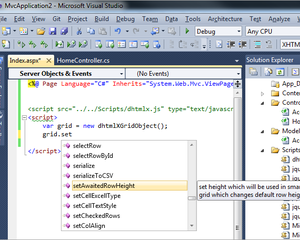
We have some exciting news for those of you who are used to work with IDEs and use the autocomplete feature. You now can enjoy autocomplete hints in your favorite IDE while you integrate the DHTMLX components into your web app. We provide the autocompletion plugins for Microsoft Visual Studio, PHPStorm, WebStorm, NetBeans, Aptana Studio, Eclipse, and others.

To add the code completion for DHTMLX library into your IDE:

 
Visual Studio 2010 | Visual Studio 2008

  • copy dhtmlx.debug.js in the same folder where dhtmlx.js is located
  • if you are using an individual component (not dhtmlx.js), rename dhtmlx.debug.js to {component}.debug.js and place in the same folder where the .js file of the component is located
DHTMLX Autocomplete - Visual Studio 2010

Visual Studio 2010 - Autocompletion for DHTMLX

 
Read more »