Archive for September, 2010

iCal Export/Import Tool for dhtmlxScheduler

Tuesday, September 21st, 2010

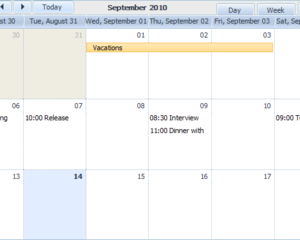
Having provided a web-based scheduling solution, dhtmlxScheduler, we understand the importance of being able to share events and tasks between users or devices, which is often done via iCal format. Due to its popularity, iCal is widely used by many companies in their applications and software (e.g., Google Calendar, MS Outlook, Mac OS X, etc.). That’s why we created something that allows you to quickly and easily export/import iCal data to/from dhtmlxScheduler. This ’something’ is a new utility – “iCal exporter”.

Before, dhtmlxScheduler could load only simple events from the iCal format and had some issues with recurring events. The tool we’re presenting today will allow you to transfer the events data from the iCal format to the format readable by dhtmlxScheduler, and vice versa (from dhtmlxScheduler to iCal). This will give you an effective way to export dhtmlxScheduler data to/from MS Outlook or Google Calendar.

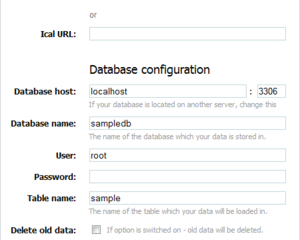
dhtmlxScheduler - Import from iCal - Web Interface

dhtmlxScheduler - Import from iCal - Web Interface

This “iCal exporter” tool has a simple web interface where you can set some resource and database configuration options. Alternatively, you can insert the code of the “exporter”, a set of PHP classes, into your own application to provide iCal export functionality for the scheduler “behind the scenes”.

With this tool you can export iCal files to XML format and use it to populate the scheduler with data, or to an Array, as an intermediate variant. All related information is already in the dhtmlxScheduler documentation where you can find all the details:
http://docs.dhtmlx.com/doku.php?id=dhtmlxscheduler:ical_export_import

To download the package, please follow the link: http://www.dhtmlx.com/docs/download/ical2scheduler.zip

Hot Fix for IE9 Available

Thursday, September 16th, 2010

When testing the DHTMLX library with IE9, we found an incompatibility issue that appears when data is loaded from an XML file. To fix this issue, please use dhtmlxcommon.js which can be downloaded here. We have also fixed the problem with drawing of node labels in dhtmlxTree in IE9 Beta.

All component packages, which are available for download from our site, already contain the fixed dhtmlxcommon.js. Users of dhtmlxSuite PRO Edition will receive the link to the compiled dhtmlx.js with applied fixes by email.

Event Calendar for WP and Joomla! Updated to Version 2.3

Wednesday, September 15th, 2010

After the release of dhtmlxScheduler 2.3, we have also updated its WordPress and Joomla! plugins to include all the latest fixes and also provide a couple of noticeable enhancements. So here we are with the latest news about the most important additions that extend the functionality of the event calendar plugins.

Although not all the new features from version 2.3 are available in the plugins, with this update we did our best to give you more freedom to configure your scheduling calendars.

Scheduler Plugins

Scheduler Plugins

Private Mode

The most significant and long-awaited new feature of this release is Private Mode. The name speaks for itself: the new option allows you to set private mode (standard or extended) and manage the access rights for end-users. It’s a very useful feature if you need to restrict editing rights or events visibility.

Read more »

Updated Export Functionality (to PDF, Excel) for Grid and Scheduler

Friday, September 10th, 2010

A few months ago we told you about the new export functionality available for dhtmlxGrid (export to PDF and Excel) and dhtmlxScheduler (export to PDF). These features were ‘fresh’ and had a few imperfections, but they have been since tested and improved. Today we present the update pack that eliminates all the known bugs.

What’s New
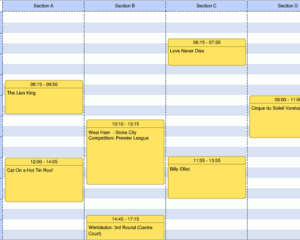
Though the bug fixes were a great deal of work, we’ve also made a number of improvements to each feature. For example, there are two major enhancements in dhtmlxScheduler-to-PDF. The first one is the option to export Unit View to PDF, which you couldn’t do in the previous version.

Scheduler - Export to PDF

dhtmlxScheduler - Export to PDF

The second improvement for the Scheduler-to-PDF service is support for custom colors. Now you can view the colored events in a PDF file, the same way as they would look in dhtmlxScheduler embedded on a webpage.

As for dhtmlxGrid, we have removed all the limitations for export functionality, which could be quite annoying if you used grids with complex structures. Now both grid-to-PDF and grid-to-Excel features support:

  • Hidden columns
  • Footer
  • Custom colors

 
So with this update you are free to use the advanced grid options without having to worry about problems on export.

dhtmlxGrid - Export to PDF

dhtmlxGrid - Export to PDF

The Grid-to-Excel service also allows custom content, which means that you can add some additional content (e.g., a company logo) to the Excel file generated from dhtmlxGrid.

Downloads
Use the links below to download the newest PHP version of the export packages:

 
UPDATE: If you need the export functionality for Java or ASP.NET, you can download these packages here.

 
Documentation
Answers to configuration questions concerning the mentioned features can be found in the appropriate documentation:

 
What’s Next
In the future, we plan to extend the list of the Scheduler views available for export to PDF, and the next update will bring printing capabilities to the TimeLine View, for both tree and cell modes. If you have any ideas or suggestions on export functionality for both dhtmlxGrid and dhtmlxScheduler, feel free to share them in the comments.